Rust Serenity External Cheat
If you'd like to purchase it, you can do so from this link: Buy Now.
If you are using external spoofer. Always run the cheat first and then the spoofer. If you run the spoofer first and then the cheat, you will get banned.
External products are better for undetection
Product does not have spoofer. This means if you got banned you will get hwid banned.
If you want to purchase spoofer, you can do so from this link: Buy Now.
Required Files
Download all required files before starting:
- Disable Windows Defender / Disable Anti-Cheat / Disable Antivirus Software
- DOWNLOAD LOADER
- Visual C++ Runtimes
- DirectX End-User Runtime
Display Software Setup
- Enable Steam overlay (if it is disabled):
- Opening Steam, click on the Steam button in the upper left corner:
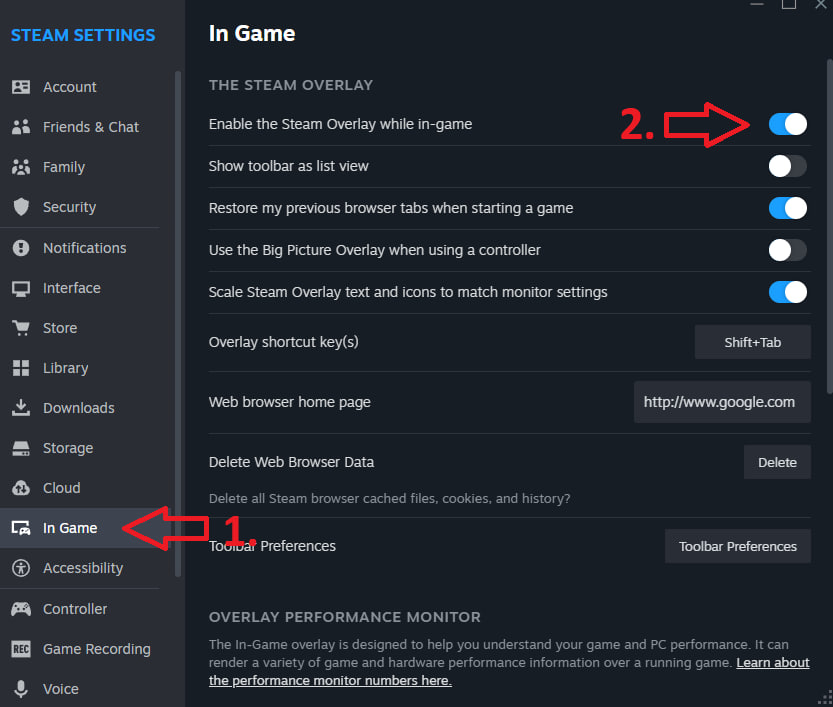
- Open the "In-game" tab
- Enable "Enable Steam overlay in-game"
Installation Requirements
System Requirements
- CPU: AES instruction set support
- BIOS: SVM / VT-X enabled
- BIOS: Secure boot disabled
- Enable Hyper-V
- RAM: 16GB
- CPU Compatibility: INTEL + AMD
- OS: Windows 10-11 (versions 1809-25H2)
Pre-Launch Checklist
- Disable antivirus
- Enable Virtualization in BIOS (SVM/VTX)
- Enable Hyper-V in windows settings
- Disable Secure Boot in the BIOS
- Launch loader
- Insert key
- Press inject
- Wait for loader to close automatically
- Start game
- Access menu with "Insert" key
Troubleshooting Guide
Loader Not Injecting – Stuck on Loading Screen
Fix: Place the loader into a new empty folder and run it as administrator
If your loader gets stuck on the loading screen, follow these steps:
- Create a new folder on your Desktop
Example:C:\Users\YourName\Desktop\Loader - Move the newly downloaded loader into this folder
- Only place the loader file there, no other files.
- Run the loader as Administrator
- Right-click the loader → Run as administrator
- Launch the loader
- It should now start properly without getting stuck.
Infinite Restarting
- If your PC reboots 2-3 times in a row, then:
- Open cmd as an administrator
- Enter this
bcdedit /set hypervisorlaunchtype auto
Display Issues
No Menu or Immediate Loader Closure
- Install Visual C++ Redistributable: VC Redist x64
Bind Issues
- Solution 1: Reinject
- Solution 2: Run overlay as administrator
Technical Errors
Error 0x296
- Reinject required
Unknown Network Error
- Check internet connection
- Disable VPN if active
Memory Allocation Errors
- Reboot PC
- Try different PC (for internet cafes)
- Clean autorun programs
Dependency Loading Errors
- Disable all protection
- Remove anti-readers and antiviruses
- Clean autorun programs
Anticheat Conflicts
- Uninstall Vanguard/Faceit
AES Instruction Set Error
- Hardware limitation, requires CPU upgrade
Virtualization Errors
VMX/SVM Support
HWID Issues Check system integrity:
wmic diskdrive get Caption, SerialNumber
wmic baseboard get SerialNumber
If commands fail, reinstall Windows
Virtual/RAID Disk Error
- Disable spoofer, or
- Disable RAID in BIOS
- Reinstall Windows
VMX is Not Supported
Fix:
- Run CMD as Administrator.
- Enter the following command:
bcdedit /set hypervisorlaunchtype off
- Reboot your PC.
- Try running the loader again.
Error: Failed to allocate memory/to map memory (x)
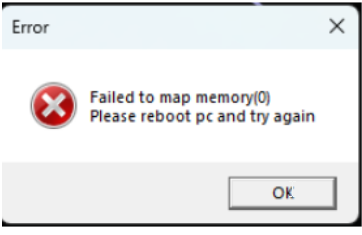
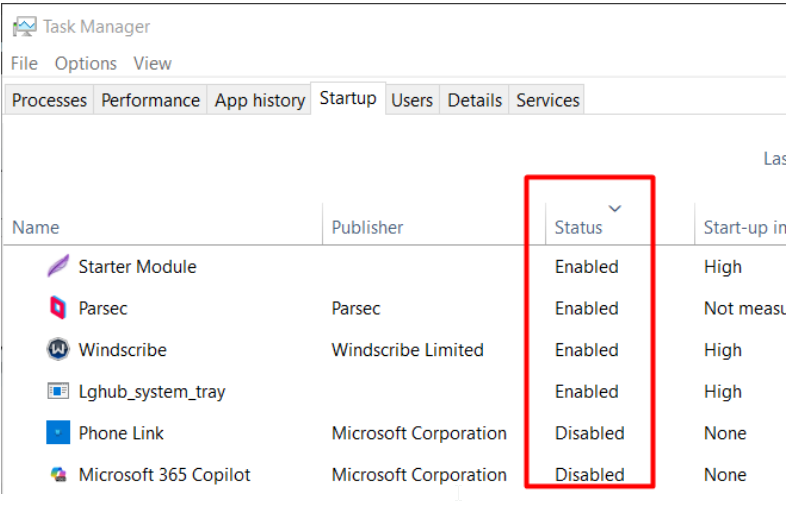
Solution:
Disable every each auto start program in task manager
Error 0x298(0)
Use VPN